AUTOMATION & RECORDING
Controller Devices
USB & MIDI Controllers
General controller support
FL Studio supports all USB/MIDI controller keyboards, keyboard synthesizers, pad controllers/drums with MIDI output and all other similar devices with General MIDI output. To play a synthesizer or other instrument in FL Studio, using an external keyboard, select the Instrument button in the Channel Rack and play the controller keyboard. Remember that sliders and knobs can also be linked to virtually any control in FL Studio.MIDI Scripting
It is possible to create custom MIDI scripts for any controller. See MIDI Scripting. There is also a MIDI Controller Scripting forum where you may find scripts for your controller.
Notes about using multiple controllers
It is possible to use up to 16 MIDI controllers simultaneously, for more details see the Multiple controllers & multiple plugin channels section on the MIDI settings page. Generally, each controller should be set to a unique MIDI channel. When playing instruments, the controllers will be automatically assigned by ascending MIDI channel number, to active instrument channels, from top to bottom in the Channel Rack. For automation of controls/knobs FL Studio will remember the MIDI channel the controller was set to when links are made to program/plugin target/s, so only the controller that made the link will control the target/s.
Custom controller support
FL Studio is preconfigured to work with a number of custom controllers. Features supported include endless (relative) knobs, switch controls, support for jog and transport controls. To enable the advanced features of your custom controller, select it in the Input list in the MIDI settings window. If the device is not listed, it does not have preconfigured support - this does not mean it won't work, just some of the special (non standard) controls may not function correctly.
Generic
These are usually small boxes filled with controls, for any kind of use
Keyboards
Piano keyboards- Alesis Photon X25
- CME UF Omnipotent Master Keyboard
- Edirol PCR-30/50
- Korg MS-20 Controller
- M-Audio Oxygen 25/49/61
- Korg nanoKEY
These keyboards also feature drum pads
- Cakewalk A-Series
- Edirol PCR-300/500/800
- Korg KONTROL49
- Korg microKONTROL
- Novation ReMOTE SL
- Novation SL MK II
- Sinn7 Kontrolux
Drum controllers
Control surfaces / mixers
- AC-7 Core (iPad Mackie MCU Sim App)
- BEHRINGER BCF2000
- Frontier Design AlphaTrack
- Frontier Design TranzPort
- Mackie Control Universal (also emulated by some other controllers ["MCU"])
- Peavey StudioMix
- Tascam US-428
- Korg nanoKONTROL
- Korg nanoKONTROL II
Performance / clip launchers (FL Studio 10.5 onward)
These are dedicated to clip launching, typically feature more pads (usually 8x8) & are "the real deal" including controller feedback and full functionality:
- Akai APC20/40 (8x5 [rotated], 3 colors, scene launch & stop pads, knobs [APC40])
- Liine Lemur customizable touch UI.
- Livid Block (8x8, monochrome, knobs)
- Novation Launchpad (8x8, a dozen colors, follows FL's native track orientation, track stop pads)
- liine Lemur (8x12, mapping designed for FL)
- Native Instruments TRAKTOR KONTROL F1 (4x4, full color pads)
These are suitable for clip launching as well, but have fewer features, usually 4x4 pads & fewer feedback colors:
Special
Your device, not on the list? Don't worry it will likely function correctly Set the Input to USB Audio Device and the Controller type to '(generic controller)' , make sure to select the 'Enable' switch to the left of the Controller type menu. For more information on setting up MIDI controllers in FL Studio, see this page.
Other resources
More controllers: For the latest list of supported devices visit the MIDI Controller Reference forum.
Controller templates: There are a number of controller templates in the FL Studio installation folder (\Program Files\Image-Line\FL Studio\System\Hardware specific). These templates are loaded into the editor that came with your controller and will map it to FL Studio. You may then be required to select the controller type in the Input settings (when FL doesn't do it automatically).
Multimedia keyboards
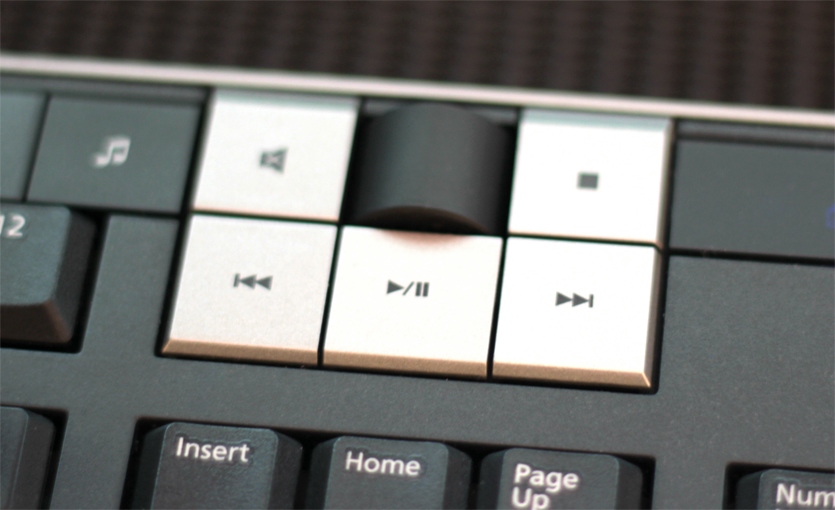
If you have a multimedia keyboard you can use the Play/Pause button to Start/Pause FL Studio, and the Stop button to stop and return the song position marker to the beginning of the Playlist. The FF/RW buttons will jump between Playlist Time Markers, if present.