MIXING & EFFECTS
Fruity Compressor
Fruity Compressor is a legacy plugin, we recommend Fruity Limiter which also has a flexible compressor section.
Fruity Compressor: Compression is one of the most important effects used in enhancing modern music. It gives kick drums more 'thump', makes bass sound 'fat'. Importantly, compression makes a mix sound much louder.
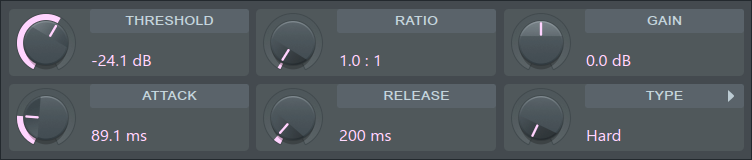
When to use: Use the Fruity Compressor on individual sounds in mixer tracks. It is particularly well suited to vocal tracks, individual kick/percussion and bass sounds. If you are mastering (compressing in the Master Mixer Track) and need to apply compression to a complete mix we recommend using Fruity Multiband Compressor or Maximus instead.
What is compression?
Compression is a form of automated gain control that reduces the dynamic range of sounds. When the input signal exceeds a predetermined threshold the gain is reduced. The art of setting a compressor is mainly in fine-tuning the magnitude, speed and timing of the automated gain changes so that the compression process does not introduce artifacts. Compressing the peak transients in a signal, frees up headroom to raise the gain of the sustained portions of the sound, this step increases loudness. NOTE: compression represents a trade-off between dynamics and loudness, welcome to the loudness wars!
Fruity Compressor is a variable-knee compressor with built-in peak limiting. The controls for this plugin relate to the relationship between input and output volume. A related, but more sophisticated, plugin is Fruity Limiter
Parameters
- Threshold - Sets the dB level at which the compressor kicks in. Range: 0.0 to -60.0 dB. The threshold should be adjusted according to the relative input level and the type of audio material. Once the threshold level is reached, compression will start, reducing the gain of the input signal according to the current Ratio, Type, Attack and Release settings.
- Ratio - Controls the amount of compression (gain reduction) that will be applied to the signal once the threshold level is reached. Range: 0.4:1 to 30:1. Ratio denotes the difference in dB between input level and output level, i.e. how much the signal above threshold level will be compressed (or expanded, at ratios below 1:1). For example, a ratio of 4:1 means that when the input level increases by 4dB, the output level of the signal above threshold will only increase by 1dB.
- Gain - Controls the amount of gain to be added or subtracted from the compressed output signal. Range: 30.0 to -30.0 dB. The gain should be adjusted to normalize the signal amplitude after compression, or to control the amount of limiting.
- Attack - Controls the time it takes to reach full compression once the threshold level has been exceeded. Range: 0.0 to 400.0 ms. Fast attack means that compression will be more or less instant. Slow attack results in the compression being gradually increased, allowing for more variations in the signal than a fast setting. Attack should be adjusted according to the type of audio material being used.
- Release - Sets the time the compressor takes to stop acting after the level has fallen below threshold. Range: 1 to 4000 ms. Short release times will make the compression more flexible and able to adapt to the input signal, but can cause fast changes in gain that may sound unpleasant. Long release times produce a signal with a more even level and less distortion, but make it harder to maximize the overall compression because small variations in signal level will be ignored.
- Type - Controls the knee type and TCR. The possible values are: Hard, Medium, Vintage, Soft, Hard/R, Medium/R, Vintage/R, Soft/R. The knee determines the dB range, above and below the threshold, in which the compression changes from 1:1 to the selected compression ratio. A hard knee setting means that compression will take place immediately after the threshold level is reached, whereas a soft knee setting indicates that compression is gradually applied over a range in the signal. See Knee Type below for more information on these values.
- Report latency - Reports processing latency to FL Studio for PDC. This option is provided for compatibility with projects prior to FL Studio 20, where latency for Fruity Compressor was not compensated. If PDC makes old projects sound different, in a bad way, deselect this option and reject the future! Normally, you should leave this option selected.
Knee Type
While attack controls the speed with which compression is applied, the compressor's knee characteristics control the rate at which compression is applied. Soft means there is a gradual increase from no to full compression as the input volume increases, while hard means the transition from no to full compression is instant once a predefined input level is exceeded.
The actual values for this property mean:
- Hard - 0 dB
- Medium - 6 dB
- Vintage - 7 dB
- Soft - 15 dB
The Vintage compression type emulates the compression curve found on some analog compressors, such as the classic Teletronix LA2A. The major difference is that the compression ratio is gradually reduced at a distance above threshold, slowly allowing the level to go back to a ratio of 1:1. This allows the loudest parts of the signal, such as drum beats and other peaks, to pass without being compressed as much as the rest of the signal. In this way, the Vintage compression type emulates electro-optical analog designs and can greatly enhance warmth and 'punch'. The Vintage compression type also affects the TCR parameter, utilizing a different release time adjustment method.
The R types enable TCR (Transient Controlled Release), a special algorithm that automatically adjusts the release time in real-time to avoid fast compression changes. The release time is adjusted in relation to the current Release parameter setting. Enabling TCR can have positive effects on some types of audio material, and help to reduce "pumping and breathing", while increasing the overall loudness of the signal.
Plugin Credits: Ultrafunk