WAVE EDITOR / RECORDER
Edison 
Edison is a fully integrated audio editing and recording tool. Edison loads into an effect slot (in any mixer track) and will then record or play audio from that position. You may load as many instances of Edison as you require in any number of Mixer Tracks or Effects slots. To open Edison press Ctrl+E in a Sampler Channel, or load from the effects menu into mixer track/s.
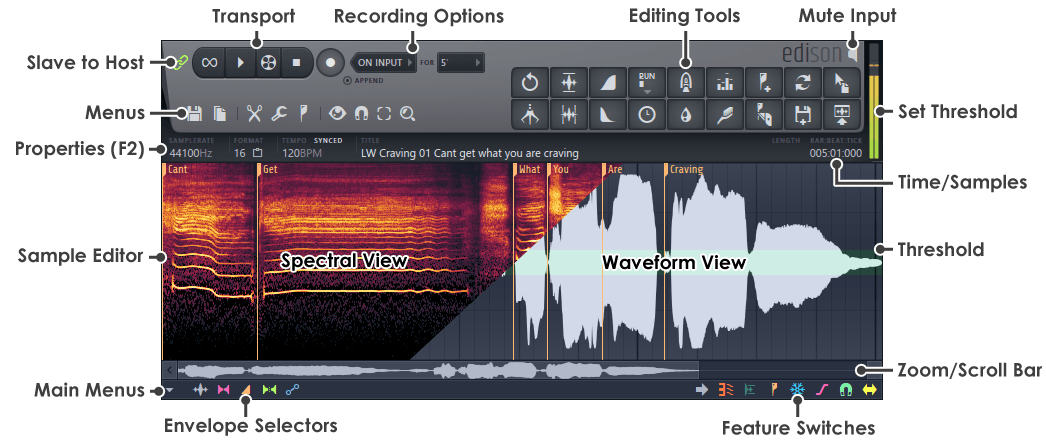
Transport Controls
Recording Options
Menu Buttons
Sample Edit Functions
Special Controls
There are a number of important and or less obvious controls, described below:
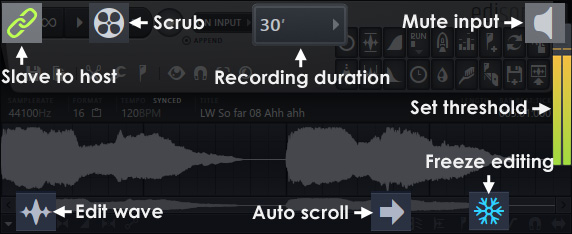
- Slave transport - Slaves the Edison transport controls to the FL Studio transport panel.
- Scrub - Left-click and hold the mouse button, and move left or right to play the sample under mouse control.
- Recording duration - Set in time, file size or unlimited (forever - or until you run out of memory).
- Mute input - When recording in Edison click here to mute/unmute the audio input.
- Set threshold - Click and drag on the peak meter to set the threshold used with functions such as Trim side noise/gate noise.
- Freeze editing - If this is selected you won't be able to edit or change any controls. Remember this as you will click it at some point and wonder why the fun has stopped.
- Edit wave - Click this to bring the wave mode to the front for editing.
- Auto scrolling - When the sample is zoomed this enables/disables the auto scrolling function.