SETUP WIZARD
Setup complete!

Done! Nothing burst into flames and all is well :)
You have now completed the basic setup of FL Studio. Press the F10 function key on your keyboard to open the System Settings at any time to change the Audio, MIDI, File or Project settings.
Need more help?
Try searching our on-line Knowledge Base. If that doesn't solve your problem you are welcome to the Tech Support forums (open to registered users only).What next?
If you are a new to FL Studio we suggest reading:
- The introductory Manual chapter to FL Studio
- The section on making professional sounding Mixes
- The FL Studio Getting Started Manual.
- Watch some Video Tutorials at YouTube, subscribe to the Image-Line channel while you are there.
- The online forums where you can meet your fellow FL Studio users & Image-Line staff in 'Looptalk'.
Using the FL Studio manual (Press F1 in FL Studio)
The manual is context sensitive, if you press F1 key on your PC keyboard while a particular window or plugin is focused (click on a window or plugin to focus it), the help will usually open at the correct page for that item. To see a video tutorial  Click here.
The manual is also a great resource and has answers to most questions you may have about using FL Studio. While the online forums may beckon you to ask questions like "How do I record my microphone?", "How do I stop that hissing sound?" or "How can I load my beats into FL Studio", the grumpy author of the manual lurks there waiting to pounce on users who ask these questions that are easily answered by following the steps outlined below:
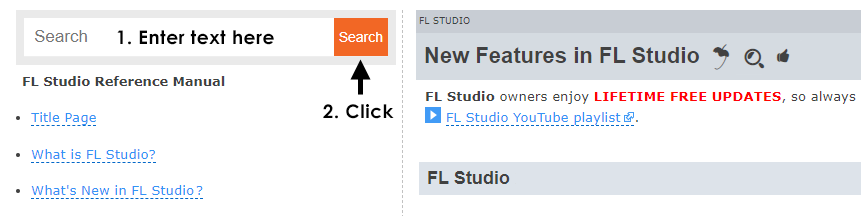
Why not start right now, let's try today's secret word 'Theodolite'. After the search is complete double-click on the topic in the 'Results window' to display it.
Give a man a fish and he will eat for a day. Teach a man to fish and he will eat for the rest of his life.
Chinese Proverb
Give an FL Studio user a fish and he will eat sushi. Teach a FL Studio user to fish and he will sit in the boat, pouting that no-one gave him another fish!
Image-Line observation